

Personalizing a garment isn't simply a matter of choosing a design size and placing it in the middle. The same logo can be perfectly proportioned on a T-shirt, appear too small on a sweatshirt, too close to the collar on a polo shirt, or poorly positioned on a jacket.
The correct size depends in particular on the type of support, its size, its cut, the area to be customized, the seams, pockets, closures or buttons, the technique used and, of course, the proportions of the image.
This guide helps you determine what size to choose, where to place your marking and how to take your measurements, whether you are working in DTF, flex, flock, sublimation, DTG, embroidery or screen printing.
Image size or marking area: what's the difference?
This is one of the first mistakes to avoid.
The image size refers to the actual dimensions of your logo, text, or illustration. A 25 x 30 cm image measures 25 cm wide by 30 cm high.
The printing area is the available space on the textile. A T-shirt can offer a usable area of approximately 30 × 35 cm on the front, without necessarily having to print a 30 × 35 cm image: a 24 × 28 cm logo centered in this area can be much more harmonious.
A visual is sized according to the available space, not the other way around. Always ask yourself three questions: What is the available width? What is the available height? Where exactly does my customization area begin?
The 3 steps to take before customizing
① Available width
Measure the distance between the elements that limit your area: side seams, zipper, pocket, button placket, decorative seams, color bands… Do not just use the total width of the garment.
② Available height
Measure the vertical space between the garment elements: collar and hem, collar and pocket, two seams, pocket and hem, closure and seam…
③ The starting point of the visual
This is the distance between the top edge of the area and the start of the print, for example, "start of the design: 8 cm below the collar". This measurement is particularly important on T-shirts, polo shirts, and sweatshirts.
Choose your support
| Support | Common areas |
|---|---|
| T-shirt | front, chest, back, sleeve |
| Sweatshirt | front, back, sleeve, area above the pocket |
| Polo | chest, back, sleeve |
| Jacket / parka | chest, back, sleeve |
| Sportswear | chest, back, number, sleeve, shorts |
| Cap | front panel |
| Tote bag | front, possibly back |
| Backpack | main panel, front pocket |
| Pants / shorts | thigh, leg, lower leg |
| Socks | ankle area according to the model |
T-shirt: dimensions and placement
The T-shirt is probably the most commonly used item for textile customization. Créadhésif offers a wide range: men's, women's, and children's models, long-sleeved and sports models.
| Area | Recommended dimensions | Investment |
|---|---|---|
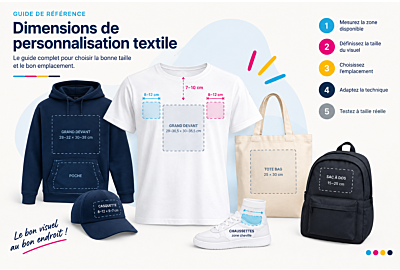
| Big in front | 28–30.5 cm × 30–35.5 cm | Centered, with the marking starting 7–10 cm below the collar, without extending beyond the side seams |
| Small front / center chest | 15–20 cm × 15–25 cm | Centered, 7–10 cm below the neck |
| Left or right chest | 8–12 cm × 8–12 cm | Approximately 7 cm below the collar, away from the side seam |
| Upper back | 20–28 cm wide | Several centimeters below the collar |
| Big back | 28–30.5 cm × 30–35.5 cm | Beginning at approximately 8–12 cm below the neck |
| Sleeve | 7–10 cm | On the flat part, away from the seam and the armhole |
Center the image properly
Don't rely on the total width of the T-shirt: locate the middle of the neck, imagine a vertical axis passing through this point, center the image on this axis and check the result by eye.
Our advice by area
- Small front: for a horizontal logo, prioritize width. An 18 x 7 cm will often be more suitable than an 18 x 18 cm square.
- Chest measurement: the reference point is the center line of the garment, not the side seam. On a fitted T-shirt, the available chest space may be smaller than on a unisex model. If you are placing two logos (left and right), align them at the same height and balance them visually.
- Upper back: ideal for company names, slogans, team names, or contact information. For a single line of text, a wide and shallow width works better than a vertical block.
- Large back: don't automatically use 30 x 35 cm on all T-shirts. On a small garment, this size becomes disproportionate.
- Sleeve: lay the garment flat and locate the most even area when the sleeve is slightly unfolded.
Suitable techniques: DTF, DTG, flex, flock, screen printing, depending on the substrate and project. See all techniques →
Sweatshirt and sweater
Sweatshirts and pullovers come in various styles: classic sweatshirts, children's models, and different cuts. Their defining characteristic: the kangaroo pocket, which becomes a real physical limitation.
| Area | Recommended dimensions | Investment |
|---|---|---|
| Big in front | 28–32 cm × 30–38 cm | Under the collar, centered, above the pocket, without touching its top seam |
| Small logo above the pocket | 15–25 cm wide | The bottom of the image is above the pocket seam, with a visual margin |
| Back | 28–32 cm × 30–38 cm | Below the neckline, the bottom of the image should not be too close to the waist |
| Sleeve | 7–10 cm | Flat section, avoiding seams |
Key point: don't choose the size of the design before considering the pocket. With a large kangaroo pocket, a horizontal logo measuring 18 x 7 cm will often look better than a square one.
Polo
Créadhésif offers several dozen polo shirt styles, including Roly and Sol's models. Polo shirts require more attention than T-shirts due to their collar and button placket.
| Area | Recommended dimensions | Investment |
|---|---|---|
| Chest | 8–10 cm wide | Away from the collar and button placket, centered in the available area |
| Back | 25–30 cm wide | Below the collar area, centered on the garment's axis |
| Sleeve | 7–9 cm | Centered in the flat area, seamless |
Do not measure from the edge of the polo shirt: use the center line, the button placket and the shoulder seam as reference points.
Jackets and parkas
Jackets, parkas, windbreakers, rainwear and workwear: the closure, pockets and seams dictate the placement.
| Area | Recommended dimensions | Investment |
|---|---|---|
| Left/Right Chest | 8–12 cm wide | Next to the closure, in the area of the textiles actually available |
| Back | 25–30 cm wide | First, measure the available width between the seams for a larger visual |
| Sleeve | 7–10 cm | Avoid cuffs, seams, technical areas, and areas that crease when worn |
On a zipped jacket, do not center the logo on the total width: measure the area between the closure and the side seam, and check pocket, button, seam and flap.
Sportswear
They are subjected to more movement, friction, and stretching. Créadhésif offers sublimable sports textiles and DTF solutions specifically designed for sportswear.
| Area | Recommended dimensions | Remarks |
|---|---|---|
| Chest logo | 8–12 cm wide | Area that does not deform excessively |
| Name on the back | 20–28 cm wide | Below the upper back, leaving space for a possible number |
| Number | approximately 20–30 cm high | No one-size-fits-all design: check the regulations, the jersey, and the available area |
| Sleeve | 7–9 cm | Small logo |
| Shorts | 8–12 cm wide | Check width, seams, pocket, and areas that are distorting |
The organization is frequently name → number → possible sponsor: define the whole before setting the dimension of the number.
Cap
Its particular constraint: the surface is curved. Reference: approximately 8–12 cm wide × 5–7 cm high, to be adapted to the front panel.
The image must be centered on the panel, away from the top seam and bottom edge, and adapted to the curve. Note: the printing surface area and the image size are two different things; the dimensions of the printing platen are not the same as those of the logo.
Tote bags and bags
Some models measure, for example, 36 x 39 cm, but the area that can actually be customized depends on the bag's construction. Measure from the left edge to the right edge of the area, then from the top edge to the bottom edge, and not just the external dimensions.
- Large marking: approximately 25 × 30 cm, centered in the panel, with a space below the top edge and away from the handles and seams.
- Small logo: approximately 10 × 10 cm (or equivalent depending on the proportions), in the center or slightly above the center depending on the design.
Backpacks
They are asking for even more precision.
- Main panel: approximately 15–25 cm wide as a starting point, to be checked on the model. Measure the flat surface between seams, closures, pockets and straps.
- Front pocket: approximately 10–20 cm wide. It may be much smaller than the main panel: never choose the size of the artwork before measuring it.
Trousers and shorts
| Area | Dimensions | Investment |
|---|---|---|
| Thigh | 8–12 cm wide | Avoid pockets, seams, and heavily pleated areas |
| Leg | 7–10 cm wide | Center of the panel, checked pants flat |
| Lower leg | 6–9 cm | Small logos or inscriptions |
Socks
Special case: For the customizable socks offered by Créadhésif, the ankle area is the sublimation zone, and the product is indicated as compatible with other techniques depending on its characteristics. Don't think in terms of "large print" as you would with a T-shirt: start with the area of the sock that can actually be customized, then adapt the design to that surface.
How do I calculate the correct size?
- Measure the available width (example: 32 cm).
- Measure the available height (example: 35 cm).
- Define a margin: for an area of 32 × 35 cm, a visual of 28 × 31 cm.
- Maintain the proportions: a 20 × 30 cm file should not become 28 × 28 cm to fill the space. It must be enlarged or reduced proportionally.
Adjust the image to the size of the garment
A 30cm wide print might be perfectly proportioned on an adult XL T-shirt, but too large for a child. Plan for several variations: a smaller print for children, an intermediate size for teenagers and smaller sizes, a standard size for adults, and possibly an enlarged size for larger sizes depending on the available space.
Do not automatically increase the visual size based on the garment size: the best reference point remains the actual width of the available area.
Check a dimension before producing
- Create your image at its actual size (for example 25 × 30 cm).
- Print it at 100%: no "fit to page" option.
- Cut around the image to obtain an exact representation.
- Place it on the fabric, in the designated spot.
- Check the size, centering, distance from the collar and seams, relationship with a pocket, and overall balance.
- Also consider the garment being worn: a perfectly centered image when laid flat can change its appearance once the fabric is on the body.
Which technique should be used?
The size of the image depends not only on the textile, but also on the technique chosen.
DTF
Highly versatile, DTF allows for the customization of cotton, polyester, and synthetic materials without pre-treating the textiles. It is suitable for logos, illustrations, multi-colored visuals, small details, and large prints.
Flex and flock
The heat transfer vinyl is cut and then heat-transferred; flocking provides a velvety finish. Créadhésif offers several ranges: creative, metallic, glittery heat transfer vinyl, etc. This technique is ideal for text, numbers, names, simple logos, monochrome markings, and specific effects.
Printable Flex
It allows for four-color printing on cotton, polyester, and synthetic materials, depending on the product. It requires a suitable printer, a cutting plotter, and a heat press.
Sublimation
Suitable for polyester textiles and substrates designed for this technique, it provides a marking integrated into the substrate, without the typical added thickness of a transfer.
DTG
DTG (Direct To Garment) involves printing directly onto textiles, including T-shirts and certain bags, depending on the material and the support.
Embroidery
Particularly suited for logos, workwear, polo shirts, jackets, caps, and other compatible items. Créadhésif now offers professional Tajima embroidery machines. Please note: a design intended for printing cannot be directly reproduced for embroidery. Small texts, very fine details, and closely spaced areas must be adjusted.
Screen printing
Suitable for repetitive production and series. The size then depends on the textile, the number of colors and the available area.
The choice of press can also influence the project
Another mistake is choosing the design without checking the equipment. The area to be customized must be compatible with the press's working surface. However, the platen size is not the maximum required design size: a press with a 40 x 50 cm plate can also produce much smaller designs.
The most common mistakes
- Use the same size for all clothing: a 25cm logo may fit an adult but be too big for a child.
- Centering by eye only: always use a reference axis.
- Measuring from the side seam: this is not always a good centering reference point.
- Forget about pockets, especially on sweatshirts.
- Forget about closures, especially on jackets and vests.
- Placing the image too close to the collar will make it appear too high once the garment is worn.
- Confusing available area and image size: an area of 30 × 35 cm does not require an image of 30 × 35 cm.
- Distort the file: always maintain the original proportions.
- Using a dimension without looking at the support: two T-shirts of the same size can have different cuts and available surfaces.
- Do not test at full size: a paper test can prevent a production error.
The Créadhésif method in 5 questions
- What type of clothing should I wear? T-shirt, sweatshirt, polo shirt, jacket, cap, bag, trousers…
- What is the available area? Measure the fabric actually.
- What are the dimensions of my image? Define the width and height without distorting the proportions.
- Where should I position it? Use a clear reference point: collar, center line, seam, pocket, closure, edge of support.
- Which technique will I use? DTF, flex, flock, sublimation, DTG, embroidery, screen printing…
The memo of the main dimensions
These dimensions are starting points, to be adapted to the support, its size, its cut and the visual.
| Area | Dimensional reference |
|---|---|
| T-shirt with a large front | 28–30.5 × 30–35.5 cm |
| small front t-shirt | 15–20 × 15–25 cm |
| Chest | 8–12 × 8–12 cm |
| Back | 28–30.5 × 30–35.5 cm |
| Sleeve | 7–10 cm |
| Large front sweatshirt | 28–32 × 30–38 cm |
| Logo above the pocket | 15–25 cm wide |
| Polo chest | 8–10 cm wide |
| Backless Polo Shirt | 25–30 cm wide |
| Jacket chest | 8–12 cm wide |
| Jacket back | 25–30 cm wide |
| Chest sport | 8–12 cm wide |
| Sports back name | 20–28 cm wide |
| Sports Number | approximately 20–30 cm high |
| Cap | approximately 8–12 × 5–7 cm |
| Large branded tote bag | approximately 25 × 30 cm |
| Tote bag with small logo | approximately 10 × 10 cm |
| Backpack | approximately 15–25 cm depending on the panel |
| Thigh-high trousers | 8–12 cm |
| Lower leg | 6–9 cm |
To go further with Créadhésif
Choosing the right dimensions is just the first step: successful personalization also depends on the technique, equipment, consumables, and production conditions. Créadhésif provides technical datasheets, guides, PDF resources, and training on DTF, sublimation, flex/flock printing, heat presses, and other techniques.
Conclusion
The correct size for a textile print doesn't depend on a single number, but on the balance between the design, the fabric, and the area to be printed. The same logo may require different sizes depending on whether it's intended for a child's T-shirt, an adult's T-shirt, a sweatshirt, a polo shirt, a jacket, a cap, a bag, or sportswear.
The most reliable method remains the same:
measure → define the area → choose the size → position → test at actual size → customize.
And before starting production, always check the characteristics of the exact model chosen: the cut, the seams, the pockets and the actual usable surface area can change from one textile to another.


