Create, Dare, Be Passionate!


Preparing files in DTF
Technical guide
Prepare your files for DTF printing
A successful DTF print starts with a well-prepared file. This guide explains all the rules to follow to achieve crisp, vibrant, and long-lasting transfers—whether you're working in Photoshop, Illustrator, or CorelDraw.
File format:
Transparent background
, 300 dpi,
CMYK mode
, Font vectorization
Essential rules
The 5 Golden Rules for DTF Textiles
Before sending your file, check these 5 points. A non-compliant file will suspend your order until we receive a corrected file.
01
The file format
Accepted: .pdf or .tiff
Not accepted: .ai, .psd, .png, .jpeg, .cdr
02
The transparent background
Delete the background layers. Never flatten the image — the background will become part of the pattern.
03
The resolution
Work at a 300 dpi . Resampling a 72 dpi image will not improve it.
04
CMYK mode
Always work in CMYK. A converted RGB file will produce muted colors.
05
Vectorize fonts
Convert all your text to curves. Without vectorization, the file will be declared non-compliant.
Important: Customer files are destroyed 15 days after printing. Always keep an original copy with your layers and editable text.
Technical exception
Ordering DTF UV (for objects)? The rules are changing!
DTF UV uses a completely different printing technology than textiles. To ensure your UV stickers are perfect, you must follow these two specific rules:
1. .PNG format only
Unlike textiles, we require the .PNG. The background must of course remain 100% transparent and the resolution 300 dpi.
2. RGB Color Mode
Your UV DTF files must be exported in RGB (and not CMYK) so that our machines can perfectly reproduce your colors.
Dimensions
Available formats and technical margins
Our transfers are printed on 60cm wide paper. A 2cm technical margin on the left and right is mandatory on all rectangular formats.
21 x 28 cm
A4 format
28 x 42 cm
A3 format
42 x 56 cm
A2 size
56 x 100 cm
Large format
56 x 200 cm
Extra large format
10 x 10 cm
Heart-shaped
5 x 5 cm
Label format
Mix-and-match tip: Combine several designs on a single sheet to reduce costs. Make the most of the available space within the strict limits of the ordered format. Use our online sheet builder to easily create your mix.
Step-by-step method
Prepare your DTF file according to your software
Whether you use Photoshop, Illustrator or CorelDraw, here is the complete procedure for each software.
Colorimetry
CMYK vs. RGB Mode: Why It Changes Everything
The choice of color mode is the number one source of unpleasant surprises in printing.
CMYK — For DTF Textile
Subtractive printing mode (Cyan, Magenta, Yellow, Black). Your DTF Textile files must be created directly in CMYK to guarantee accurate color reproduction.
RGB — For DTF UV & Screens
Display mode by adding light. This is the mandatory mode for DTF UV, but should be avoided for DTF Textile as it risks dulling your colors during automatic conversion.
Free printed color chart available.Over 2,000 colors with their exact CMYK values, printed on our machines. Contact us to receive it and choose your colors with complete confidence.
Recommended CMYK values per color (Textile)
Intense blackC:30 M:30 Y:30 K:100
Pure redC:0 M:100 Y:100 N:0
Bright blueC:100 M:50 Y:0 K:0
GreenC:85 M:0 Y:100 N:0
OrangeC:0 M:50 Y:100 N:0
Simulated goldC:10 M:25 J:100 N:25
Flesh toneC:0 M:15 Y:23 K:0
BrownC:50 M:70 Y:100 K:60
Calibrate your screen.Your screen operates in RGB. Without calibration (using a Spyder X type probe), the colors perceived may be very different once printed, particularly for DTF Textile.
What we manage for you
The white undercoat: you don't have to do anything
The white ink deposited under your design is automatically generated by our team during the compliance check.
Automatic contraction of 2 pixels so that the underlayer remains invisible on dark surfaces.
It supports the colours and improves the adhesion of the DTF powder which acts as glue.
What not to do: Do not add white to your file — a double underlayer would distort the final rendering.
Frequently Asked Questions
FAQ — Preparing DTF files
Answers to the most frequently asked questions from our customers before sending their files.
What file format is accepted for DTF printing? +
Accepted formats are .ai, .psd, .pdf and .tiff. .png, .jpeg and .cdr formats are rejected as they do not guarantee proper transparency management.
Why does the background need to be transparent? +
The white underlayer is generated automatically. A non-transparent background will be printed and will become inseparable from the design.
Which resolution should I use? +
300 dpi at actual size. Any interpolation from a low-resolution image does not improve the quality.
CMYK or RGB? +
CMYK is mandatory for textiles. RGB is only for DTF UV. Automatic conversion degrades colors.
Should I add the white undercoat? +
No, it is automatically generated with contraction. Never add it to your file.
What formats are available? +
A4, A3, A2, 56x100 cm, 56x200 cm + special formats (10x10 cm, 5x5 cm).
Place an order
Is your file ready? Choose your print option.
Whether it's textiles or objects, choose your DTF solution.
Any doubts about your file?
Our team checks for compliance before printing.
Contact us before ordering.
What's on
DTF Transfer Ink - 2nd Generation - White - 1L
49,00 € 40,83 €
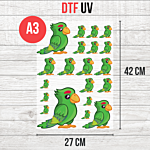
DTF UV Transfer Sheet - A3 Size - 27 x 42 cm
9,50 € 7,92 € From 6,50 €

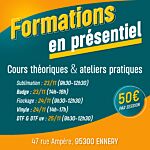
In-person training (half-day)
0,00 € 0,00 €