Create, Dare, Be Passionate!


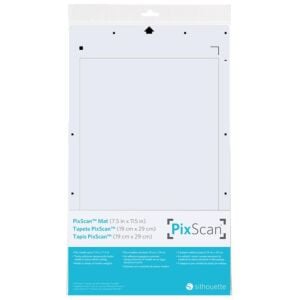
PixScan Silhouette Cameo Clipping Mat
18,99 € 15,82 €
Availability: In stock
SKU
SILH_CUT-MAT-PIX12-3T
This cutting mat allows you to cut out an image already printed on, for example, a magazine page, a printed drawing, or any other pre-printed material. It also allows you to place dotted lines in a specific location on the surface. A clever and creative tool to adopt without delay!
Using it couldn't be simpler. "Take a picture of the mat with the image, import it, and cut!"
1. Place your printed image on the Pix Scan mat.
2. Take a picture of the mat and the image placed on it, either with a scanner or a camera.
- With a scanner: scan the entire mat after placing the pre-printed image on it.
- With a camera: place the mat on a flat surface. Take a picture of the entire mat with the pre-printed image on it. The picture can be taken from the front or at a slight angle. Transfer the image to your computer.
3. In your Silhouette Studio software, click on the PixScan icon (located in the upper left corner) and follow the on-screen instructions to import your image.
4. Perform your cut as usual.
Créadhesif Tip: Simplify your life by using your smartphone's camera to import the mat design and the pre-printed image into your software. Simply calibrate your smartphone using the link available in Silhouette Cameo version 3.1.
Compatible with:
- Silhouette Cameo® (original)
- Silhouette Cameo® 2
- Silhouette Cameo® 3
- Silhouette Cameo® 4
- Silhouette Cameo® 5
- Silhouette Curio®2
Cutting area: 21.6 x 29.2 cm.
Works only with Silhouette Studio version 3.1 and above.
| Manufacturer | Silhouette |
|---|
Write your own review