Create, Dare, Be Passionate!




Silhouette Connect PC & MAC Plug-In
43,99 € 36,66 €
Availability: In stock
SKU
SILH_CONNECTDIGITAL
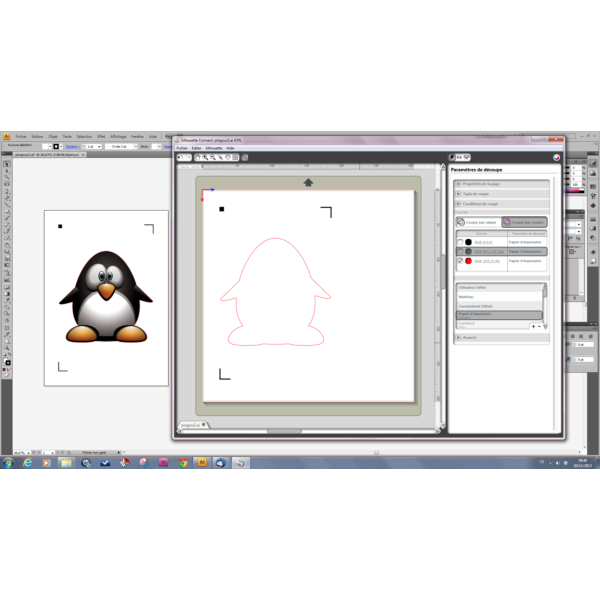
Discover a brand new software that allows you to directly interface the Silhouette Cameo and Silhouette Portrait with professional Illustrator and Corel Draw software, on both PC and Mac.
Don't wait any longer to explore the many possibilities this software offers!
This software will allow you to:
- Manage the carrier page format
- Control cutting parameters
- Generate a weeding frame for vinyl films and materials with backing.
This plug-in offers a wide range of possibilities for all your creations. Let yourself be inspired and open a new door to creativity!
Créadhesif Tip: If you're starting out with your Cameo, we recommend using our starter kits to familiarize yourself with the different customization methods.
The added benefit of this product is that this software will also allow you to make a selective cut, by layer or by color.
Please note: if you are only ordering this software, do not add shipping costs to your order; choose the "store pickup" option to avoid any fees. The software will be sent to you by email as a code. You will not receive any other physical media by mail.
For your information, this software can be installed on 3 workstations.
Compatible systems:
Mac - OS X 10.6.8 and above
PC - Windows XP, Vista, 7, 8, 8.1
Compatible graphics software (full version only):
Adobe Illustrator CS4 - CS6, CC, CC2014
Coreldraw X4 - X7
You can install this plug-in on 3 different computers.
| Manufacturer | Silhouette | ||||
|---|---|---|---|---|---|
| Documents | Instructions for downloading the Silhouette Connect Plug-in For Mac
Software Download Silhouette Connect®
|

Write your own review